
Choose a data path, not a slogan
The phrase “private dictation” can describe very different products. One app can send every recording to a remote service. Another can transcribe entirely on the PC. A third can offer both routes, depending on the model, a rewrite command, a history feature, or a setting you enabled weeks ago.
That is why the useful comparison is not cloud companies versus trustworthy companies. Reputable cloud services can use encryption, controls, contracts, and retention settings. Those safeguards matter. The architectural question is different: does a remote system need to receive your voice before it becomes text?
This guide compares the three common routes and names current examples to make the distinction concrete. Provider features and policies change, so the examples reflect public vendor documentation checked on 25 September 2026—not a permanent verdict on any product.
The two basic dictation routes
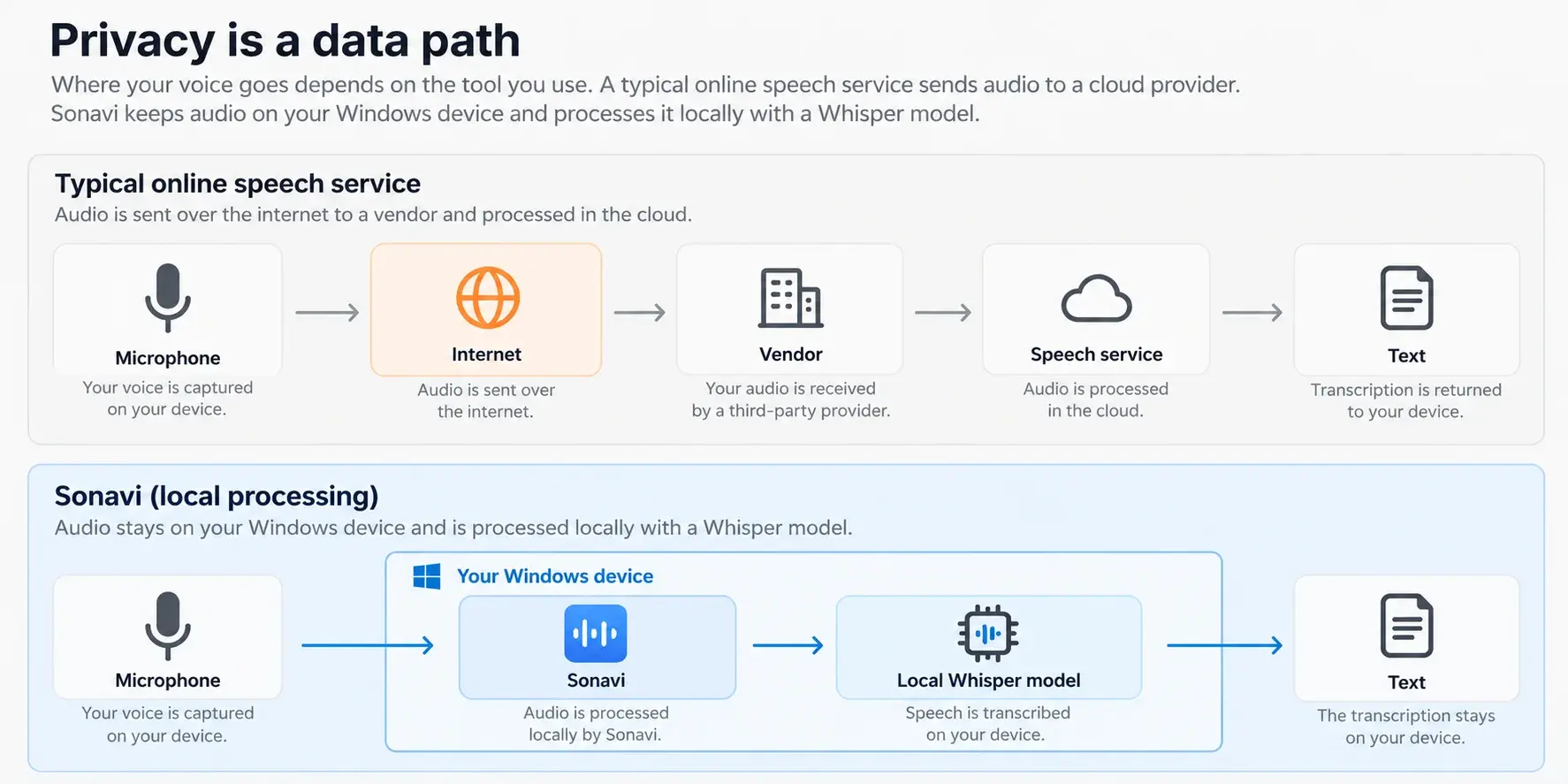
Cloud dictation relies on a remote trust chain
In a cloud workflow, your audio travels from the dictation app to infrastructure operated by the vendor or its providers, is transcribed remotely, and returns as text. The provider may be careful with that data: encryption can protect the journey and storage; access controls and contracts can restrict use; a retention setting can limit persistence. Those are real protections.
They do not make the workflow local. The transcription still depends on systems outside your computer, their configuration, their providers, and the rules that govern them. Each additional processor can enlarge the group of systems whose behavior you need to trust.
Wispr Flow is a clear current example of this category. Its Data Controls page says transcription occurs in the cloud, while model-improvement sharing and Dictation Cloud Storage are separate controls. That distinction is useful for any buyer: turning off training or persistent storage does not, by itself, answer where speech recognition happens.
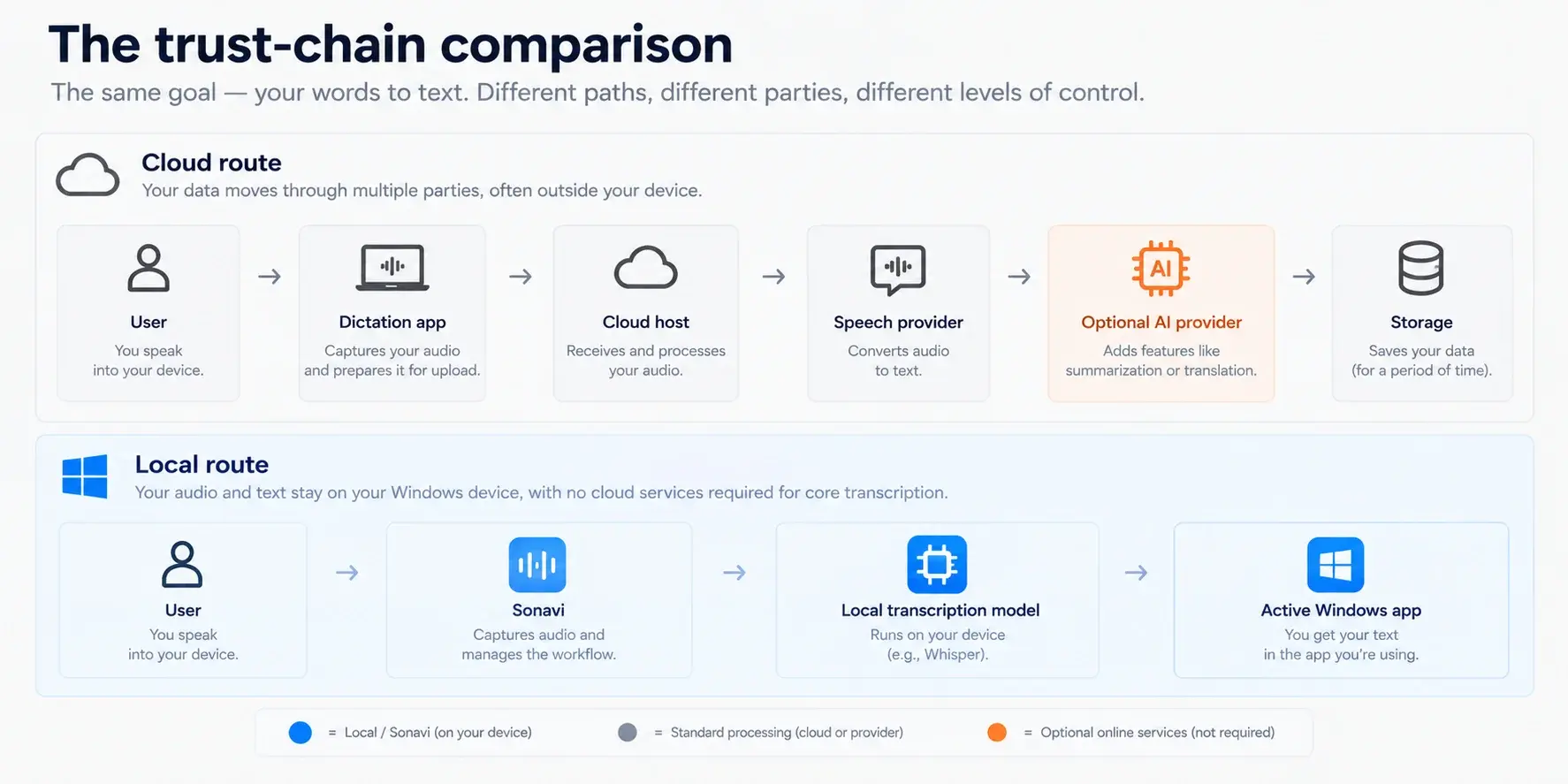
The trust-chain comparison
Hybrid dictation changes with the feature you choose
Hybrid products are not inherently less private; they are more configurable. The practical responsibility moves to understanding which model and which feature is active. A local speech model can keep microphone audio on the device, while a cloud model can send it to a provider. A local transcript can also become remote later if a rewrite, summary, synchronization, or contextual feature uses an online AI service.
Current vendor documentation illustrates the point. Superwhisper documents both local or offline modes and cloud-hosted speech models. Spokenly documents local models that keep audio and transcription on-device, along with cloud models and optional AI Instructions that can send a transcript and selected context to an AI service even when speech recognition was local.
There is no need to treat that as a gotcha. It is a trade-off. Hybrid tools can offer more choices in accuracy, speed, cross-device convenience, or writing assistance. The right privacy question is simply: which route will this exact model and feature take with my work?
Check every feature that can change the route
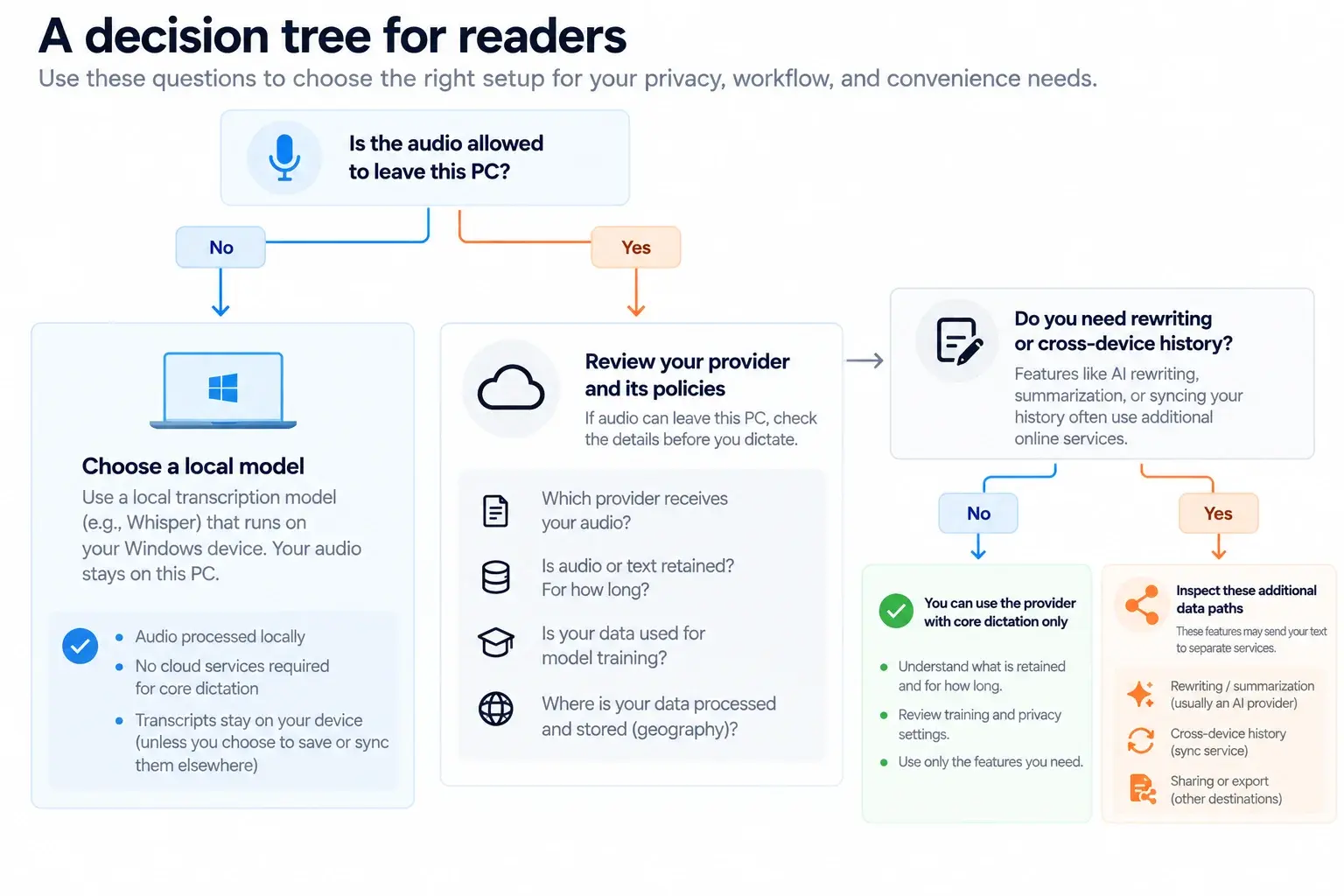
Before dictating confidential material into a configurable tool, check these boundaries rather than relying on a single privacy label:
- The selected speech-recognition model: local, managed cloud, or a provider connected with your own API key.
- Text processing after transcription: rewriting, summaries, formatting, commands, and AI instructions can have a different route from speech recognition.
- Context features: the active app name, nearby text, a clipboard, or a selected passage may be additional input.
- History and synchronization: storing text for later or making it available across devices creates a second lifecycle after dictation ends.
- Model downloads, updates, feedback, and support: these can need the internet even when core dictation does not.
A decision tree for choosing a setup
Local AI is practical, not hypothetical
Local dictation is not exclusive to Sonavi, and that is good news for anyone who wants more control over voice data. Several products offer on-device models. Google AI Edge's Eloquent is another public example: Google describes its Mac version as running fully on-device and offline across its feature set.
Eloquent is a macOS example rather than a Windows alternative at the time this guide was checked. Its importance here is architectural: modern hardware can turn speech into useful text—and even perform some voice-driven editing—without requiring a server connection. The question is no longer whether local AI can work. It is whether the product you choose makes the local route clear and easy to keep selected.
History creates a second privacy decision
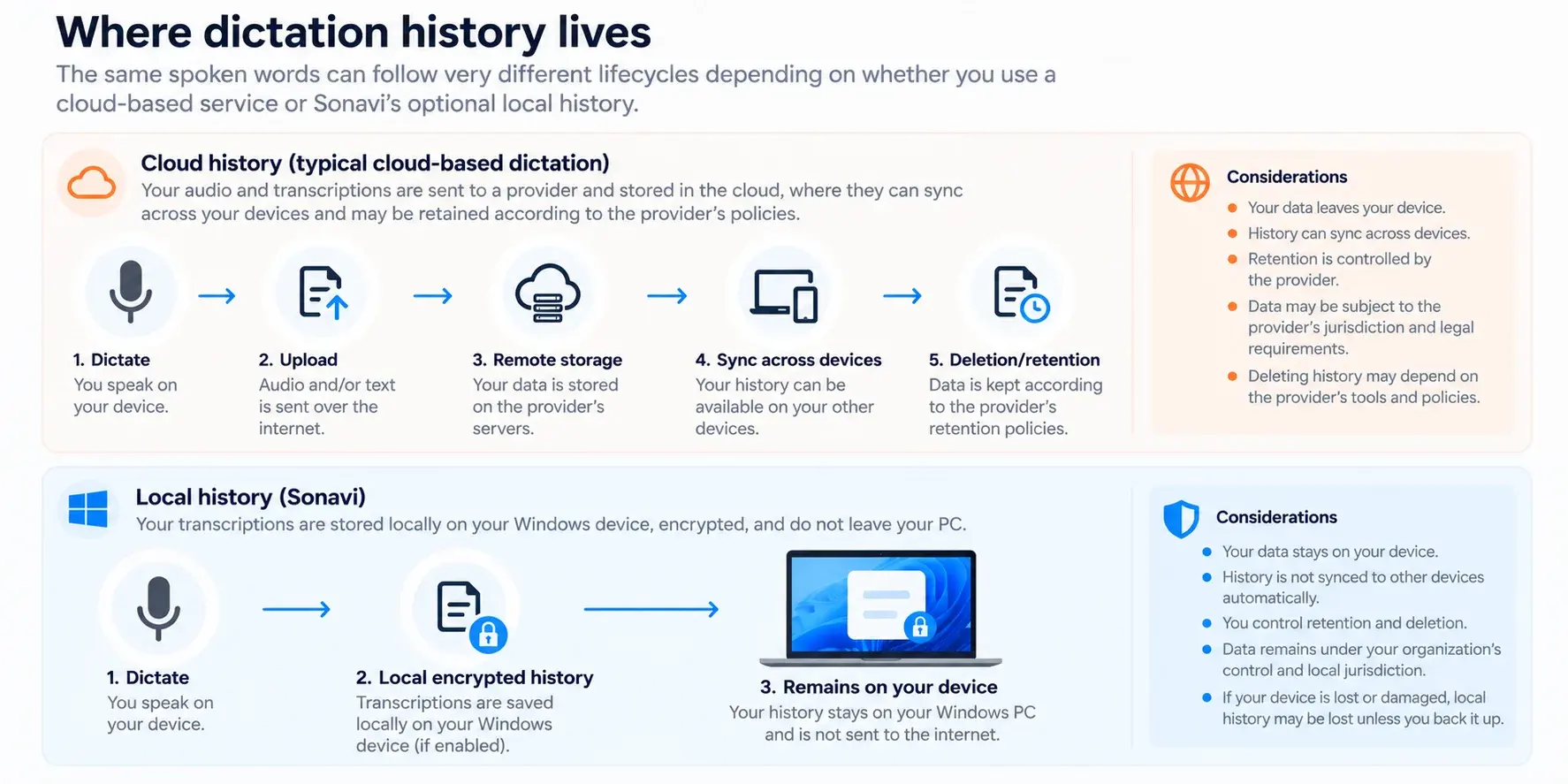
Dictation feels momentary: speak, receive text, move on. History changes that. Cloud history can be useful because it makes previous dictations available across devices, but it also means audio or text may have a retention period and a remote storage location. For organizations, the location can introduce additional contractual or jurisdiction questions.
A local history makes a different trade-off. Sonavi's optional history stays on the Windows device and is protected with local storage and Windows Data Protection API. It is useful for reviewing past work without requiring cloud synchronization, but it remains part of the device's security boundary. A person with an unlocked or compromised PC may still be able to reach information that is locally available.
Neither choice is universally correct. Choose persistent, cross-device convenience when it is worth its additional path; choose local retention when keeping that path short is more important. What matters is that the product explains which one you are choosing.
Where dictation history lives
A fair comparison standard
Cloud controls, local models, and hybrid settings all have legitimate uses. Compare products by the route used for your chosen feature—not by whether a marketing label sounds reassuring.
Read the current provider documentation
These primary sources support the examples above. Revisit them before making a buying or compliance decision, because features, providers, and policies can change.
- Wispr Flow Data Controls: Explains cloud transcription, training controls, cloud storage, and contextual processing.
- Superwhisper changelog and model updates: Documents current local and cloud model capabilities as they change.
- Spokenly privacy policy: Explains the local, managed-cloud, bring-your-own-key, and AI Instruction paths.
- Google AI Edge Eloquent overview: Describes Eloquent's fully on-device and offline macOS workflow.
FAQs
Is cloud dictation unsafe?
Not automatically. Responsible cloud services can use important safeguards such as encryption, access controls, retention settings, and contractual limits. Cloud dictation nevertheless requires your speech to be processed outside your PC, which is a different trust boundary from local transcription.
Does a local speech model mean every feature stays local?
No. Check post-processing, summaries, AI instructions, context features, history, and synchronization separately. A tool can recognize speech locally and still send the transcript or related context to an online service for another feature.
Does encryption make cloud dictation the same as local dictation?
No. Encryption is an important protection for data in transit and at rest, but a cloud service still needs to receive and process the data. Local transcription avoids that remote speech-processing step for the core workflow.
Can Sonavi work offline?
Yes for core dictation after Sonavi and a transcription model are installed. Internet access can still be needed for separate activities such as model delivery, updates, website use, feedback, or support.