
The sentence before the sentence
You press a shortcut and begin an ordinary email: “Tell Sarah the revised number is €2.8 million. And mention that Daniel has not signed the agreement yet—actually, remove that last part.” A moment later, clean text is waiting in the message. It feels like typing, only faster.
But the part you corrected, the name you did not want to repeat, and the number you would rather not say aloud twice all existed before the final email did. For dictation, that is the useful privacy question: not only whether the finished text is sensitive, but where your voice went before it became text.
Sonavi is built around a simple answer. In its normal workflow, the speech-recognition work happens on your Windows PC. After the required model is installed, the application can turn speech into text without making a remote transcription request.
What exists before the final transcript
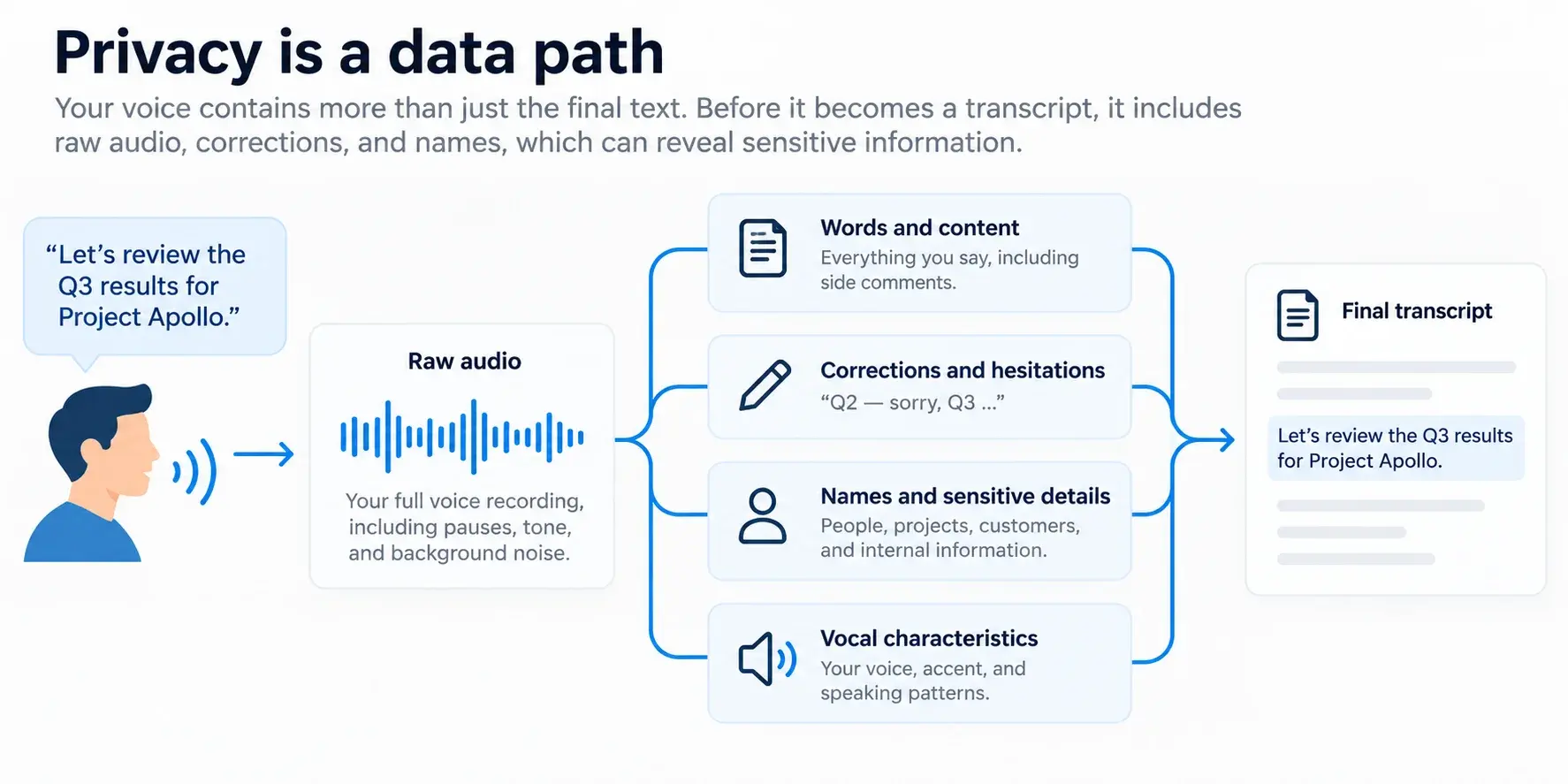
Privacy is a data path
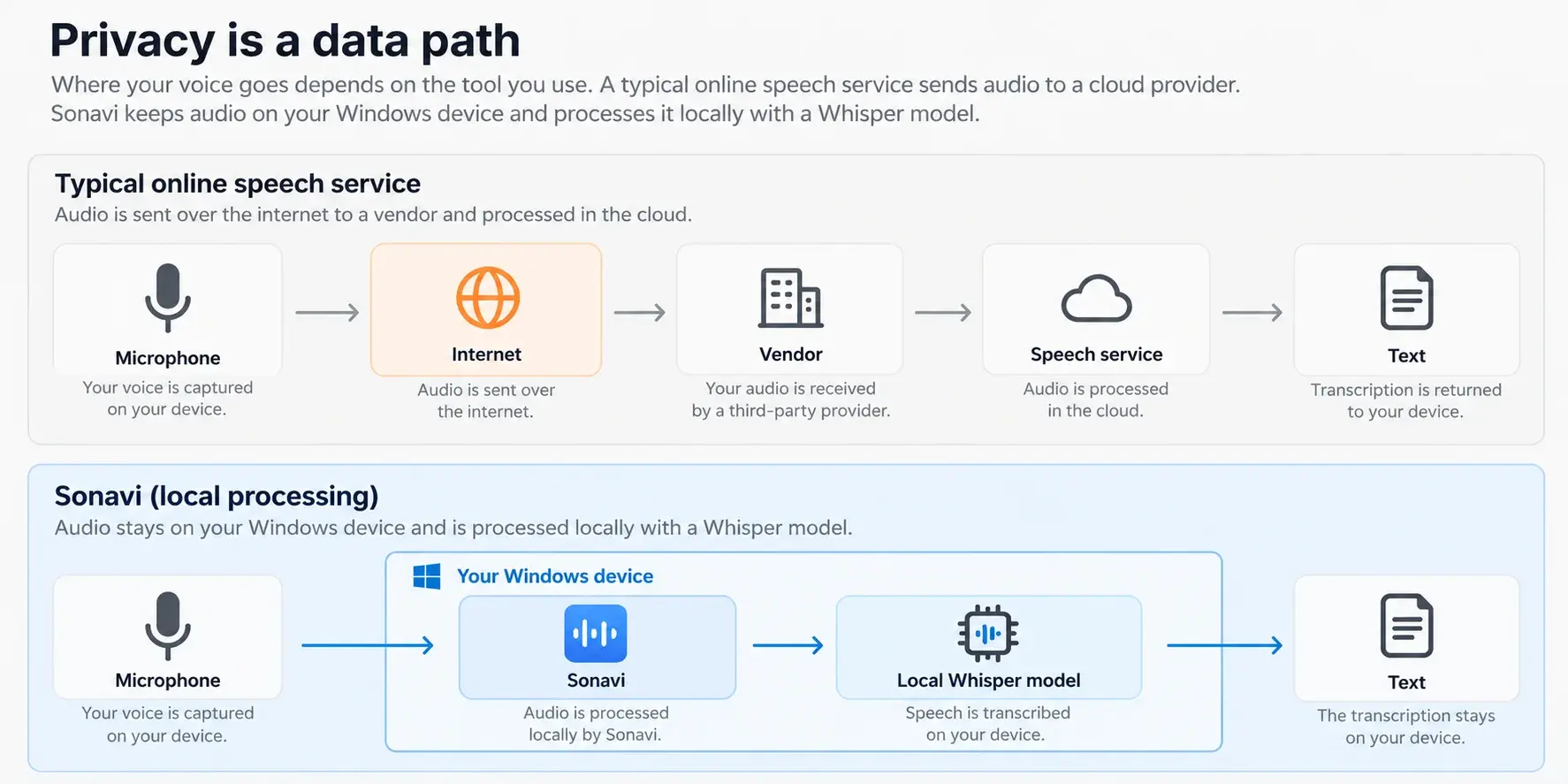
Two dictation apps can look almost identical from the desk: you speak, a pause passes, and words appear. Underneath, they may ask for very different kinds of trust. A cloud workflow sends audio from your computer to a remote service for processing, then returns text. A local workflow keeps the microphone input and speech-recognition model on the same Windows device.
That does not make every cloud service careless, and it does not make a local PC invulnerable. Reputable services can use encryption, tight contracts, retention controls, and clear settings. Those safeguards matter. They simply protect a process that still needs to happen beyond your computer.
Local processing changes the starting point. The sensitive audio does not need to enter a vendor’s transcription infrastructure at all. That is why local dictation is more than a privacy-policy preference. It is a smaller data path and a smaller trust boundary.
Cloud versus local dictation data paths
Training is only one question
“Do you train on my data?” is a reasonable question for any AI tool. It is not the whole privacy review. A service can choose not to train on your recording while still receiving it for transcription. It can process the audio briefly without keeping a permanent history. It can also offer separate settings for cloud storage, text improvements, contextual features, or cross-device sync.
None of those choices are automatically wrong. They are different choices. The problem begins when one reassuring answer is mistaken for every answer. Turning off model training, for example, does not by itself tell you where speech recognition happens, whether raw audio is retained, which providers process it, or whether surrounding app context is used.
A more useful habit is to follow the path: where is audio processed, where is the transcript stored, what optional features receive it, and which systems are involved? Once you ask those questions, “private” stops being a badge and becomes something you can actually understand.
The questions worth asking
Before you trust any dictation workflow with work, client, health, financial, or personal information, ask these questions in plain language:
- Does the microphone audio leave this PC for speech recognition?
- Does the finished transcript leave this PC for rewriting, formatting, syncing, or history?
- Are raw audio, transcripts, edits, or surrounding app context kept after the request is complete?
- Which settings, models, or AI-enhancement features change the data path?
- Which outside providers, if any, receive the information?
- Can the core dictation workflow still work with the internet disconnected?
Local transcription is not always a local workflow
The distinction matters because modern dictation tools are often more capable than a simple microphone-to-text converter. An app may recognize speech locally, then send the resulting transcript to an online service to rewrite it, summarize it, apply instructions, synchronize it, or make it available on another device. That can be useful—but it is a different privacy shape.
Sonavi’s core promise is deliberately easy to follow: speak into the active Windows app, and local speech recognition turns that voice into text on the computer in front of you. Sonavi is designed for live dictation, not as a cloud editing pipeline hidden behind a microphone button.
If you turn to an optional online service, submit feedback, download a model, or receive an update, those are separate actions with their own network needs. The point is not to pretend software never communicates with the internet. It is to be precise about what does not need to communicate: your normal dictation audio and transcript do not need a remote speech service to do their job.
A privacy claim you can test
The nicest thing about local processing is that it is not only a promise. It is something you can check in the rhythm of a normal afternoon. Once Sonavi and its transcription model are installed, disconnect from Wi-Fi or Ethernet, open a fresh note, start dictation, and speak a few sentences. The text should still appear.
That small test does not prove every security property of a computer. It does prove something tangible about the core workflow: speech recognition can continue when there is no route to a remote transcription service. For privacy-sensitive work, that is far more useful than a vague claim of being “secure.”
What local does and does not protect
Local processing is not magic. If malware controls an unlocked Windows session, if someone has access to your computer, or if you paste text into another service, sensitive information can still be exposed. Dictation also ends as text in the app where you choose to use it, so that app and its own sync settings remain part of your decision.
Sonavi can keep optional transcript history on the Windows device, with local protection based on SQLite and Windows Data Protection API. That is meaningful, but it is not a promise that no one could ever access an already-unlocked or compromised machine. Good privacy writing should say both things: local processing removes an unnecessary remote-data risk; it does not eliminate endpoint security responsibilities.
The same honesty applies to software delivery. Sonavi can need internet access to download models and receive updates, and the website can process the kinds of operational information described in its privacy policy. Those activities are distinct from a voice-to-text request. Keeping those boundaries clear is part of respecting the reader.
The simplest definition
Cloud privacy asks you to trust how a remote system will handle your voice. Local privacy begins by making that remote system unnecessary for transcription.
Why this matters now
Your voice can contain a draft you will delete, a client name, an address, an internal decision, a medical detail, or simply a half-formed thought. Speech also carries the false starts and corrections that never make it into the text you finally keep. Treating the raw microphone stream as sensitive is not alarmist; it is practical.
Modern Windows PCs are capable of doing the transcription work themselves. So the question is no longer whether local AI can make useful dictation possible. It can. The better question is whether an app makes its data path understandable enough that you know what you are choosing.
Sonavi is for people who want that answer to stay simple: your voice becomes text on your PC. You can still review the result, use it in the Windows apps where your work lives, and decide what to share next. But the first, most sensitive step does not need to leave your desk.
FAQs
Does Sonavi send my dictation to a cloud transcription service?
No for the normal dictation workflow. Sonavi uses local speech recognition on your Windows PC after the required model has been installed. Review the privacy policy for separately initiated actions such as website use, updates, downloads, feedback, and support sharing.
Can I use Sonavi offline?
Yes for core dictation after Sonavi and the required transcription model are installed. Internet access can still be needed for separate activities such as model delivery, software updates, feedback, support, or other optional online services.
Does local transcription mean all text stays private forever?
No. Local transcription keeps the speech-recognition step on your PC, but the final text is used in the Windows app you choose. Your device security, Windows account, clipboard behavior, local-history preferences, and the privacy practices of any destination app still matter.
How can I verify that core dictation works locally?
After installing Sonavi and its transcription model, temporarily disconnect from the internet and dictate a short note. If the text appears, the core speech-recognition workflow is functioning without a remote transcription request.