
Why the warning appears
Sonavi is in early access and a validly signed installer can still build Windows reputation over time.
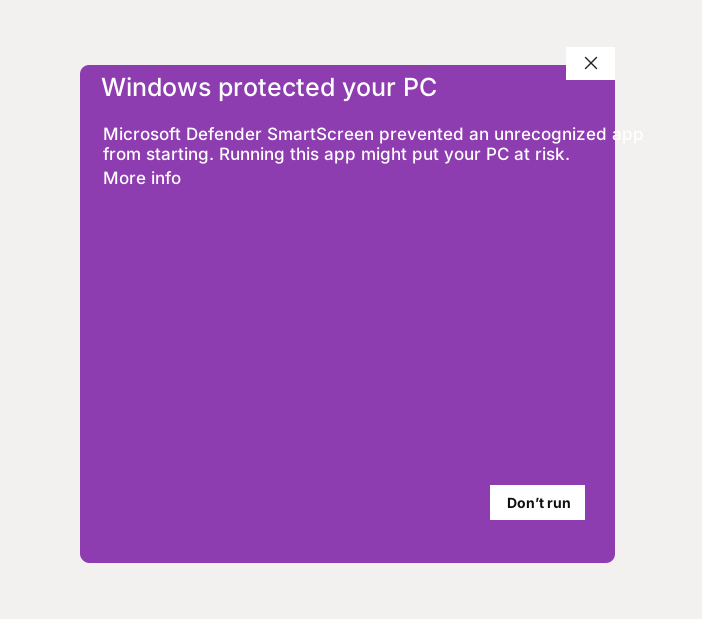
Windows may show a SmartScreen-style prompt even when an installer came from the official Sonavi download page. An unknown-publisher notice or an invalid or missing digital signature is different: stop and contact support rather than bypassing that warning.
What the Windows prompt looks like
What to check before installing
Use this sequence before continuing with an installer:
- Download Sonavi only from the official Sonavi website download page.
- Trust only downloads that start from sonavi.app and redirect to updates.sonavi.app.
- Avoid installers sent through random file-sharing links, message attachments, or unofficial mirrors.
- Confirm the installer matches the current release information on the website, including the SHA-256 checksum when the website shows one.
- Open the installer properties and confirm that Windows shows a valid digital signature from the expected Sonavi publisher.
- Stop and contact support if the publisher is unknown or unexpected, the signature is missing or invalid, or an organization-managed device blocks the installer. Do not select Run anyway or disable security controls.
- Only after those checks pass, continue through any remaining SmartScreen prompt and finish the installation.
Privacy during use
Sonavi is built around local handling of audio and transcription work on your device.
We do not receive your audio files or transcription contents through the normal product workflow, so the Windows installation warning is about publisher verification, not about Sonavi sending your spoken content to us.
FAQs
Does the Windows warning mean Sonavi is unsafe?
Not by itself, but it is a reason to stop and verify the installer. Use the official Sonavi download page, trust only sonavi.app and updates.sonavi.app, confirm the expected publisher and valid digital signature, and avoid unofficial copies. Do not bypass an unknown-publisher or invalid-signature warning.
What if Windows reports an unknown publisher?
Do not install it. A download URL alone is not enough to establish trust. Contact Sonavi through the private support path and include the warning details without posting the installer or diagnostic information publicly.
Does Sonavi receive my recordings or transcripts?
No. Audio and transcription content are handled locally on your device in the normal product workflow.
Use the official installer
Only continue when the installer came through sonavi.app or updates.sonavi.app and Windows shows a valid digital signature from the expected Sonavi publisher. Do not trust copied installers, bypass an unknown-publisher warning, or disable security controls.